The Growth Hacker's Summary
- [!]The "API Era" is Over: If you are still using tools that hook into Instagram's Private API (like the old Jarvee), you are asking for a ban. Instagram detects non-official app signatures instantly.
- [+]Visual Automation is Key: The only safe automation in 2026 is "GUI Automation"—simulating a human finger tapping on a real screen (Cloud Phone) running the official Instagram App.
- [$]Quality > Quantity: You can't follow 1,000 people a day anymore. The new meta is "Hyper-Targeted DMs" and "Story Interactions" scaled across multiple isolated accounts.
If you’ve been in the Instagram marketing game for a while, you remember the "Good Old Days."
You remember firing up Jarvee or MassPlanner, loading up 50 accounts, and setting them to follow 800 people a day. You went to sleep, and woke up with 1,000 new followers.
Then came the "Action Block" apocalypse. Then the phone verification loops. Then the permanent bans.
Let’s be real: In 2026, Instagram Automation feels like walking through a minefield.
You try a Chrome extension? Shadowban.
You try a cheap cloud bot? "Compromised Account" warning.
You hire a VA to do it manually? They log in from a different IP and lock the account.
Does this mean automation is dead? No. It just means the method has changed.
The era of "API Hacking" is dead. The era of "Hardware Simulation" has begun. This guide will show you exactly how to build a ban-resistant Instagram infrastructure using Cloud Android Phones.
1. Why Your "Bot" Keeps Getting Blocked
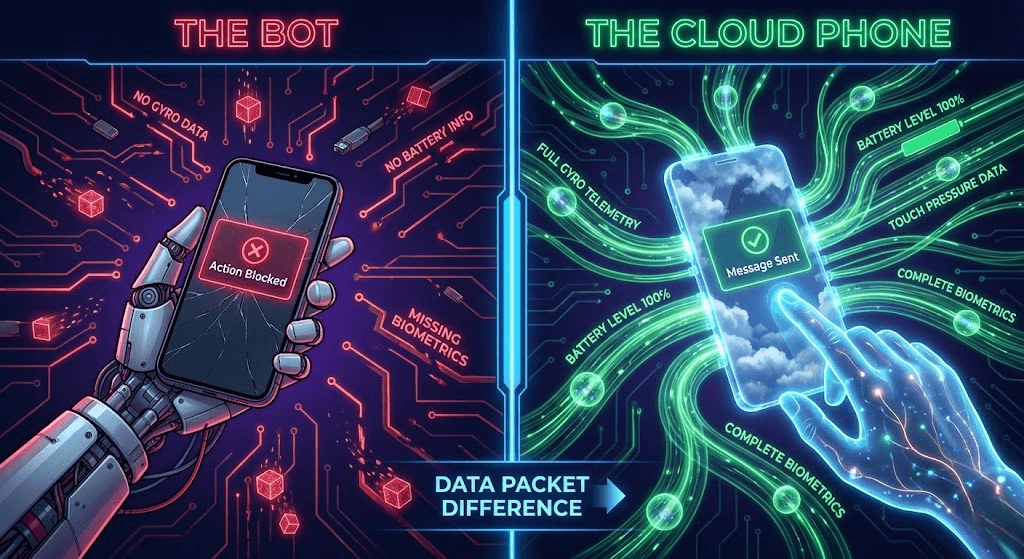
To beat the algorithm, you have to understand what it’s looking for. Instagram's AI (developed by Meta) doesn't just look at what you do; it looks at how you do it.
The "Private API" Trap
Most cheap automation tools work by reverse-engineering Instagram's API. They send a "Like" request directly to the server without opening the app.
The Problem: The official Instagram App sends encrypted telemetry data along with every request: Gyroscope movement, battery level, screen touch pressure, and OS uptime.
API bots send none of this. They send a "naked" request.
Result: Instagram sees a request coming from "Android," but with zero sensor data. Flagged.
The "Browser" Trap
"Okay," you say, "I'll use a browser automation tool like Selenium."
The Problem: Instagram hates desktop browsers. They severely limit actions (e.g., no Reels posting, limited DMs) on the web version. Plus, browser fingerprinting (Canvas, WebGL) makes it trivial to link 50 accounts running on the same server.
2. The Solution: Visual Automation on Cloud Phones
The only way to look 100% human is to use the Official Instagram App on a Real Android ID.
Since you can't glue 50 phones to your wall, you use Promoi mobile ai use.
Here is why this bypasses the "Action Block" filters:
- Official APK: You install the app from the Play Store. No modified "modded" apps.
- GUI Interaction: Automation is done via ADB (Android Debug Bridge). It simulates a physical tap on the screen coordinates (x,y). The app receives a "Touch Event," just like a finger.
- Hardware Fingerprint: The cloud phone reports valid sensor data, carrier info, and device model (e.g., Samsung S23).
3. The "Cold DM" Infrastructure: 100 DMs/Day Safely
Cold DMs (Direct Messages) are the holy grail of sales. But sending too many gets you flagged as spam.
The Limitation: A single account can strictly send maybe 20-40 cold DMs a day before hitting a soft block.
The Fix: Horizontal Scaling (The Matrix Strategy).
The Mathematics of Scale
Goal: Send 500 DMs/Day.
The Wrong Way
1 Account trying to send 500 DMs.
Result: Banned by 10:00 AM.
The Moimobi Way
25 Cloud Phones x 20 DMs each.
Result: 500 DMs sent safely.
Infrastructure Setup:
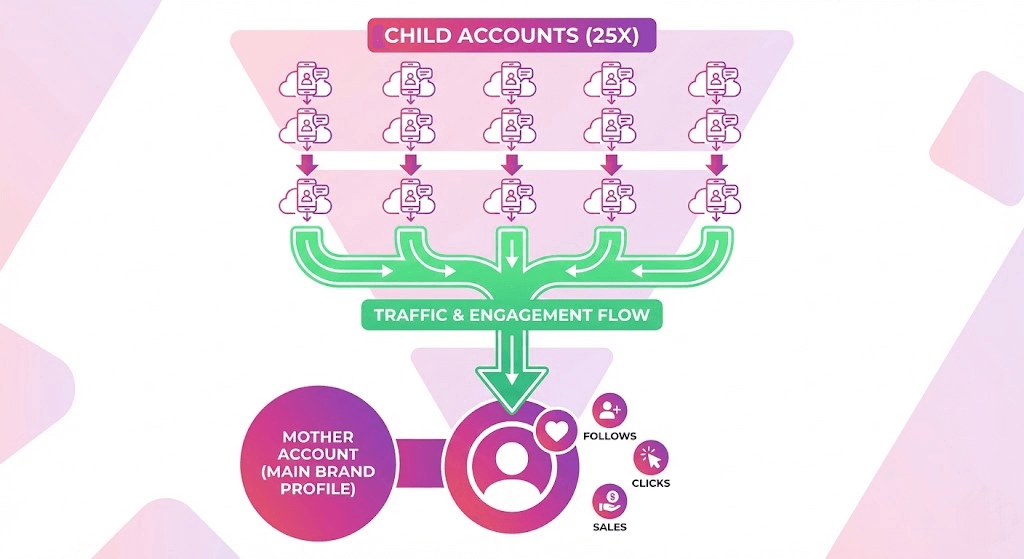
1. Mother/Child Method: You have 1 Main Account (Mother) that looks pristine. You have 25 Scraper/DM Accounts (Children) running on Cloud Phones.
2. The Funnel: The Child accounts send the DM: "Hey, saw you like fitness. Check out @MainBrand for tips."
3. Risk Isolation: If a Child account gets banned for spamming, your Main Brand account is safe.
4. The 14-Day Warm-Up Schedule (Crucial)
Do not spin up a cloud phone and start DMing immediately. You need to build a "Trust Score."
Here is the SOP we use internally for fresh Instagram accounts on Moimobi.
| Days | Actions (Daily Limits) | Automation Rule |
|---|---|---|
| 1-3 | Complete Bio. Upload 3 photos. Scroll Feed. Like 5 posts. 0 DMs. | Manual Only (Use Cloud Phone Control). |
| 4-7 | Follow 10 people. Like 20 posts. View 50 Stories. 0 DMs. | Light Automation (Random delays > 60s). |
| 8-14 | Follow 30 people. Like 50 posts. Send 5 "Warm" DMs (replies to stories). | Full Automation Enabled. |
| 15+ | Scale up slowly. Max 20-30 Cold DMs/day per account. | Maintenance Mode. |
5. The "4G" Factor: Proxies Matter
Instagram is unique. Unlike Google which loves Residential IPs, Instagram loves 4G/5G Mobile IPs.
Why? Because real users are on mobile data.
The Configuration:
In your Moimobi dashboard, do not use the default Data Center IP. It works, but your Trust Score will be capped.
Ideally, bind a 4G Mobile Proxy to your instance.
Budget Tip: If 4G proxies are too expensive ($40+/mo), high-quality Static Residential (ISP) proxies are the next best thing. Just avoid "Data Center" IPs at all costs.
6. Growth Hack: Mass Story Viewing (The 2026 Version)
"Mass Looking" was huge in 2019. It died when Instagram patched the API.
But with Cloud Phones, it's back—albeit slower and more human.
You can write a script (or use a tool) that simply scrolls through Stories on your Cloud Phone.
1. The user sees your name in their "Viewed By" list.
2. They get curious: "Who is this?"
3. They click your profile.
4. If your bio is good, they follow.
Why Cloud Phones win here: This requires downloading images/videos. Browsers struggle with this at scale. Cloud Phones render Stories natively. It uses bandwidth, but it's 100% safe because it counts as "Consumption," not "Spamming."
7. The Cost of Infrastructure
"Is it worth spending $500/month on cloud phones?"
Let's compare it to Facebook Ads.
Scenario: You want 100 new leads a day.
- Ads: CPC is $2.00. CPA is $20.00. Cost = $2,000/day.
- Cloud Farm:
50 Cloud Phones ($1,000/mo).
50 Proxies ($200/mo).
Output: 1,000 DMs/day -> 10% Reply -> 100 Leads.
Total Cost = $1,200/month (vs $60,000/mo for ads).
Even if you factor in the cost of buying accounts and software, the ROI of an owned infrastructure is unmatched.
8. FAQ
A: Technically, the Instagram App allows 5 logins. Practically, don't do it. If one account gets flagged, Instagram "chain-bans" all logged-in accounts on that Device ID. Stick to 1 Account = 1 Cloud Phone for maximum safety.
A: Since Moimobi gives you a full Android OS, you can install automation apps directly on the device (like "Auto Clicker" apps), or better yet, control it externally via Python + ADB scripts. This keeps the device clean of suspicious apps.
A: Use physical SIM cards for the initial registration if possible. If not, use high-quality SMS verification services (Non-VoIP). Once logged in on the Cloud Phone, the session stays active indefinitely, so you rarely need to re-verify.
Reclaim Your Reach
Stop fighting the algorithm with broken tools. Build a native, isolated Android infrastructure for your Instagram growth.
Deploy Instagram Nodes ($19.9/mo)